
/display/SP/Preservation Component Profiles taken on 2016-03-30.
The original wiki at wiki.opf-labs.org is being decommissioned.
Preservation Component Profiles
 |  During the PC meeting of 2013-06-18 (Paris) new component profiles have been defined, commented and agreed upon by the CC, AS and QA WP leads. The new definition of profiles contains active contributions from Donal, Carl, Miguel and Hélder. Further information on this topic will be uploaded soon. A small report is being devised at the moment. |
Motivation
The PC subproject develops and packages a variety of tools for preservation actions, characterisation and quality assurance. Additionally it packages existing tools to ensure that all services are compliant with and can be deployed in the SCAPE platform. Existing tools usually come in the form of command line programs that provide a variety of output formats. To guarantee interoperability between services and enable automation of preservation processes, PC creates preservation components that provided a standardised interface. These preservation components are based on Taverna workflows as a common language. They either wrap command line tools with necessary post-processing, are directly implemented as workflows or are composed of other components.
To allow discoverability (e.g. for preservation planning, watch or other users), the components must be annotated with relevant information using a common vocabulary. Standardised interfaces add the possibility of automating parts of a preservation process. Additionally, dependencies allow the execution platform to run the components. All these aspects are defined as preservation component profiles.
Using Taverna workflows allows domain experts from the testbed as well as the wider community to engage in the development of preservation components. The Taverna workbench will implement a mechanism to easily validate workflows against profiles.
Component usage
Migration and QA example
To increase the level of automation and thus scalability in preservation planning, the planning component queries the component repository (myexperiment.org) for migration components based on the migration paths and other criteria specified in the policy of the organisation (e.g. by license). The preservation planner the selects fitting alternatives and all representative samples are migrated to the respective target format. Based on the objective tree for this plan, a template of a QA workflow is generated that contains input ports for the path to the files as well as output ports for measurable properties for this file. A preservation planner can then open this template in Taverna and add characterisation and quality assurance components from myexperiment.org that provided the needed properties. The QA components are then used to evaluate the possible alternatives. The preservation planner can select the best alternative and a executable plan (example) is generated by combining the migration component with quality assurance.
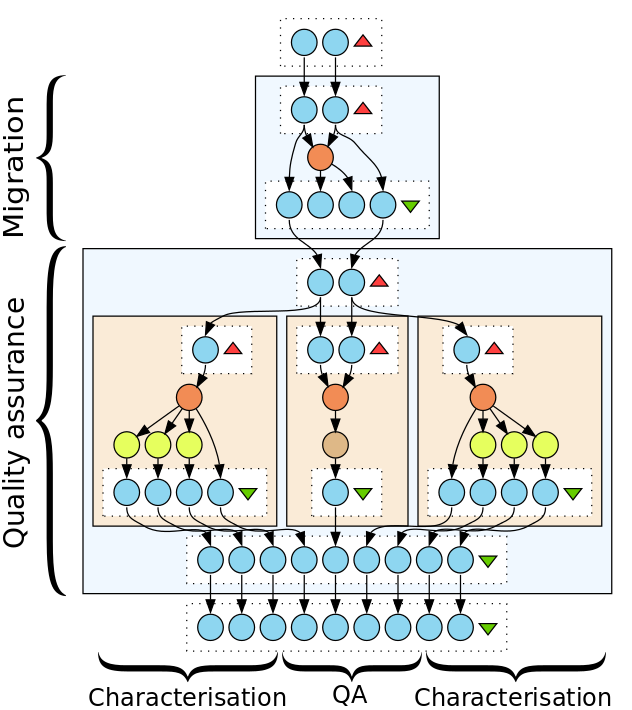
How to read this document
The profile has four different areas to check:
- Input ports: Input ports of the workflow.
- Output ports: Output ports of the workflow.
- Taverna activities: Taverna activities that have to be present in the workflow.
- Annotations: Annotations on the level of the workflow.
Notation
Port (Datatype, Depth, Example) [Cardinality]
Description
A port is specified by a denomination, the expected datatype, the port depth and an example for an expected value. Additionally it contains the cardinality and a short description.
Taverna activity [Cardinality]
Description
The taverna activity specification contains the Taverna activity and cardinality as well as a short description.
@Annotation name (Datatype, Example) [Cardinality]
Description
A generic annotation contains a specific name, the datatype of the annotation value and an example. Additionally it contains the cardinality and a short description.
@Annotation name (Fixed value) [Cardinality]
Description
A fixed annotation contains the annotation name and a fixed value the annotation must have. Additionally it contains the cardinality and a short description.
The cardinality denotes how often the element can occur, default cardinality is [1, 1].
Please note that the provided URLs are not final and will be specified in a separate vocabulary.
Profiles
Common for all components
These ports and annotations are common for all components, and help to identify them, the profile they adhere to, dependencies and other information used for discovery, assembly and execution.
Input ports
No requirements.
Output ports
- Other ports [0, *]
Components can have ports not specified here to ensure necessary flexibility.
Taverna activities
- External Tool service [0, *]
Components can use command line tools using the external tool service. If an External Tool service is used, the dependency has to be specified.- @Dependency [1, *]
- @Name (String, e.g. "imagemagick") [1, 1]
- @Version (String, e.g. 0.8) [1, 1]
- @License (String, e.g. "GPL2") [1, 1]
- @Environment (String, e.g. "Debian") [1, 1]
- @Homepage (URL, e.g. "http://ffmpeg.org/") [0, 1]
- @Dependency [1, *]
Annotations
- @ID (URI) [1, 1]
ID of the component, generated by the component catalogue.
The ID is not embedded but the component gets a unique ID/version when uploaded to myExperiment. - @Version (Integer, e.g. 1) [1, 1]
Version of the component, generated by the component catalogue.
The version is not embedded but the component gets a unique ID/version when uploaded to myExperiment. - @Profile (URI, e.g. http://purl.org/DP/components#MigrationAction) [1, 1]
The profile this workflow adheres to. - @ProfileVersion (Decimal, e.g. 1.0) [1, 1]
The profile version this workflow adheres to. Currently not added. - @Name (String) [1, 1]
Human readable name of the component.
This is covered by the existing workflow annotation "Title". - @Description (String) [0, 1]
Description of the component.
This is covered by the existing workflow annotation "Description". - @Author (String) [0, 1]
Author of the component.
This is covered by the existing workflow annotation "Author". - @Owner (String) [1, 1]
The user who uploaded the component, generated by the component catalogue.
This is implemented as property of the uploaded workflow in myexperiment. - @License (Enum, e.g. GPL2) [0, 1]
License of the component. This can be set independently from the used tools.
This is implemented as property of the uploaded workflow in myexperiment.
Migration action component
Input ports
- from_uri (String, Single value/List, e.g. "/tmp/data/image.cr2") [1, 1]
URI identifying the object to migrate.- components#portType components#FromURIPort [1, 1]
Identifies this port as the input path for the migration.
- components#portType components#FromURIPort [1, 1]
- to_uri (String, Single value/List, e.g. "/tmp/data/migrated.tiff") [1, 1]
URI identifying the the migrated object- components#portType components#ToURIPort [1, 1]
Identifies this port as the output path for the migration.
- components#portType components#ToURIPort [1, 1]
- parameter (String, Single value, e.g. "-x -a 0") [0, *]
A parameter string that can be used in an external tool service- components#portType components#ParameterPort [1, 1]
- components#acceptsPredefinedParameter (components#PredefinedParameter) [0, 1]
Predefined parameter options that can be provided at this input port.- components#parameterValue (String, e.g. "-x -a 0") [1, 1]
The actual parameter to provide - components#parameterDescription (String, e.g "Convert to jpeg") [1, 1]
Human readable description of the parameter
- components#parameterValue (String, e.g. "-x -a 0") [1, 1]
Output ports
No requirements.
Taverna activities
No requirements.
Annotations
- components#migrates (components#MigrationPath) [1, *]
The type of file this component can migrate from and to what format can it migrate to.- components#fromMimetype (String, e.g. "image/tiff") [1, 1]
The type of file this component can migrate from corresponding to the migration target specified in OutputMimetype as a wildcard enabled mimetype. - components#toMimetype (String, e.g. "image/tiff") [1, 1]
The type of file this component can migrate the filetype specified in the InputMimetype as a wildcard enabled mimetype.
- components#fromMimetype (String, e.g. "image/tiff") [1, 1]
Characterisation component
Input ports
- object_uri (String, Single value/List, e.g. "/tmp/data/image.tiff") [1, 1]
URI identifying the object to characterise.- components#portType components#ObjectURIPort [1, 1]
Identifies this port as the input for the URI to the characterisation file
- components#portType components#ObjectURIPort [1, 1]
- parameter (String, Single value, e.g. "-x -a 0") [0, *]
A parameter string that can be used in an external tool service- components#portType components#ParameterPort [1, 1]
Identifies this port as a parameter port - components#acceptsPredefinedParameter (components#PredefinedParameter) [0, 1]
Predefined parameter options that can be provided at this input port.- components#parameterValue (String, e.g. "-x -a 0") [1, 1]
The actual parameter to provide - components#parameterDescription (String, e.g "Convert to jpeg") [1, 1]
Human readable description of the parameter
- components#parameterValue (String, e.g. "-x -a 0") [1, 1]
- components#portType components#ParameterPort [1, 1]
Output ports
- Measure (String, e.g. "image/tiff") [1, *]
A measure that the component produces from characterisation.- components#providesMeasure (http://purl.org/DP/quality#Measure, e.g. "http://purl.org/DP/quality/measures#52") [1,1]
The URI uniquely identifying the measure.
- components#providesMeasure (http://purl.org/DP/quality#Measure
Taverna activities
No requirements.
Annotations
- components#handlesMimetype (component#AcceptedMimetype) [1, *]
The type of file this component can characterise as a wildcard enabled mimetype.
Quality assurance object comparison component
Input ports
- from_uri (String, Single value/List, e.g. "/tmp/data/image.cr2") [1, 1]
URI identifying the first object for quality assurance.- components#portType components#FromURIPort [1, 1]
Identifies this port as the input for the URI to the QA source file.
- components#portType components#FromURIPort [1, 1]
- to_uri (String, Single value/List, e.g. "/tmp/data/migrated.tiff") [1, 1]
URI identifying the second object for quality assurance.- components#portType components#ToURIPort [1, 1]
Identifies this port as the input for the URI to the QA target file.
- components#portType components#ToURIPort [1, 1]
- Measure (String, Single value, e.g. "image/tiff") [0, *]
A measure that the component needs for QA.- components#acceptsMeasure (http://purl.org/DP/quality#Measure, e.g. "http://purl.org/DP/quality/measures#52") [1,1]
The URI uniquely identifying the measure. - components#portType (components#FromMeasurePort or components#ToMeasurePort or components#MeasurePort) [1, 1]
Identifies this port as the input for a measure either from the From-file or the To-file
- components#acceptsMeasure (http://purl.org/DP/quality#Measure
- parameter (String, Single value, e.g. "-x -a 0") [0, *]
A parameter string that can be used in an external tool service- components#portType components#ParameterPort [1, 1]
Identifies this port as a parameter port - components#acceptsPredefinedParameter (components#PredefinedParameter) [0, 1]
Predefined parameter options that can be provided at this input port.- components#parameterValue (String, e.g. "-x -a 0") [1, 1]
The actual parameter to provide - components#parameterDescription (String, e.g "Convert to jpeg") [1, 1]
Human readable description of the parameter
- components#parameterValue (String, e.g. "-x -a 0") [1, 1]
- components#portType components#ParameterPort [1, 1]
Output ports
- Measure (String, e.g. "true") [1, *]
A measure that the component produces from QA.- components#providesMeasure (http://purl.org/DP/quality#Measures, e.g. "http://purl.org/DP/quality/measurse/52") [1,1]
The URI uniquely identifying the measure.
- components#providesMeasure (http://purl.org/DP/quality#Measures
Taverna activities
No requirements.
Annotations
- components#handlesMimetypes (components#AcceptedMimetypes) [1, *]
The type of file this component can migrate from and to what format can it migrate to.- components#fromMimetype (String, e.g. "image/tiff") [1, 1]
The type of file this component can compare as wildcard enabled mimetype - components#toMimetype (String, e.g. "image/tiff") [1, 1]
The type of file this component can compare as wildcard enabled mimetype
- components#fromMimetype (String, e.g. "image/tiff") [1, 1]
Quality assurance property comparison component
Input ports
- from_uri (String, Single value/List, e.g. "/tmp/data/image.cr2") [0, 1]
URI identifying the first object for quality assurance.- components#portType components#FromURIPort [1, 1]
Identifies this port as the input for the URI to the QA source file.
- components#portType components#FromURIPort [1, 1]
- to_uri (String, Single value/List, e.g. "/tmp/data/migrated.tiff") [0, 1]
URI identifying the second object for quality assurance.- components#portType components#ToURIPort [1, 1]
Identifies this port as the input for the URI to the QA target file.
- components#portType components#ToURIPort [1, 1]
- Measure (String, Single value, e.g. "image/tiff") [2, *]
A measure that the component needs for QA.- components#acceptsMeasure (http://purl.org/DP/quality#Measure, e.g. "http://purl.org/DP/quality/measures#52") [1,1]
The URI uniquely identifying the measure. - components#portType (components#FromMeasurePort or components#ToMeasurePort or components#MeasurePort) [1, 1]
Identifies this port as the input for a measure either from the From-file or the To-file
- components#acceptsMeasure (http://purl.org/DP/quality#Measure, e.g
- parameter (String, Single value, e.g. "-x -a 0") [0, *]
A parameter string that can be used in an external tool service- components#portType components#ParameterPort [1, 1]
Identifies this port as a parameter port - components#acceptsPredefinedParameter (components#PredefinedParameter) [0, 1]
Predefined parameter options that can be provided at this input port.- components#parameterValue (String, e.g. "-x -a 0") [1, 1]
The actual parameter to provide - components#parameterDescription (String, e.g "Convert to jpeg") [1, 1]
Human readable description of the parameter
- components#parameterValue (String, e.g. "-x -a 0") [1, 1]
- components#portType components#ParameterPort [1, 1]
Output ports
- Measure (String, e.g. "true") [1, *]
A measure that the component produces from QA.- components#providesMeasure (http://purl.org/DP/quality#Measure, e.g. "http://purl.org/DP/quality/measures#52") [1,1]
The URI uniquely identifying the measure.
- components#providesMeasure (http://purl.org/DP/quality#Measure, e.g
Taverna activities
No requirements.
Annotations
- components#handlesMimetypes (components#AcceptedMimetypes) [1, *]
The type of file this component can migrate from and to what format can it migrate to.- components#fromMimetype (String, e.g. "image/tiff") [1, 1]
The type of file this component can compare as wildcard enabled mimetype - components#toMimetype (String, e.g. "image/tiff") [1, 1]
The type of file this component can compare as wildcard enabled mimetype
- components#fromMimetype (String, e.g. "image/tiff") [1, 1]
Validation component
Input ports
- object_uri (String, Single value/List, e.g. "/tmp/data/image.tiff") [1, 1]
URI identifying the the object to validate.- components#portType components#ObjectURIPort [1, 1]
Identifies this port as the input for the path to the QA source file.
- components#portType components#ObjectURIPort [1, 1]
- Measure (String, Single value, e.g. "image/tiff") [0, *]
A property that can be checked against the object.- components#acceptsMeasure (http://purl.org/DP/quality#Measure, e.g. "http://purl.org/DP/quality/measures#52") [1,1]
The URI uniquely identifying the measure.
- components#acceptsMeasure (http://purl.org/DP/quality#Measure, e.g
- parameter (String, Single value, e.g. "-x -a 0") [0, *]
A parameter string that can be used in an external tool service- components#portType components#ParameterPort [1, 1]
- components#acceptsPredefinedParameter (components#PredefinedParameter) [0, 1]
Predefined parameter options that can be provided at this input port.- components#parameterValue (String, e.g. "-x -a 0") [1, 1]
The actual parameter to provide - components#parameterDescription (String, e.g "Convert to jpeg") [1, 1]
Human readable description of the parameter
- components#parameterValue (String, e.g. "-x -a 0") [1, 1]
Output ports
- Measure (String, e.g. "true") [1, *]
A measure that the component produces from validation.- components#providesMeasure (http://purl.org/DP/quality#Measure, e.g. "http://purl.org/DP/quality/measures#52") [1,1]
The URI uniquely identifying the measure.
- components#providesMeasure (http://purl.org/DP/quality#Measure, e.g
Taverna activities
No requirements.
Annotations
- components#handlesMimetype (component#AcceptedMimetype) [1, *]
The type of file this component can characterise as a wildcard enabled mimetype.
Migration Executable Plan
Input ports
- from_uri (String, Single value/List e.g. "/tmp/data/image.tiff") [0, 1]
URI identifying the the object to migrated.- #portType ("http://purl.org/DP/components#FromURIPort") [1, 1]
- Identifies this port as the input for the path to the file to migrate.
- to_uri (String, Single value/List, e.g. "/tmp/data/image.tiff") [0, 1]
URI identifying the the migrated object.- #portType ("http://purl.org/DP/components#ToURIPort") [1, 1]
- Identifies this port as the input for the path to the migrated file.
Output ports
- success (boolean, Single value, e.g. "true") [1, 1]
Indicating whether the action was successful.- @Property (URI, e.g. "http://purl.org/DP/components#action_successful") [1,1]
- Measure (String, e.g. "true") [1, *]
A measure that the component produces.- @Measure (URI, e.g. "http://purl.org/DP/quality/measures#525") [1,1]
The URI uniquely identifying the property. - #portType ("http://purl.org/DP/components#FromMeasurePort" or "http://purl.org/DP/components#ToMeasurePort" or "http://purl.org/DP/components#MeasurePort") [1, 1]
Identifies this port as the input for a property either from the From-file or the To-file
- @Measure (URI, e.g. "http://purl.org/DP/quality/measures#525") [1,1]
Services
- Migration component [1, 1]
The migration component in this executable plan.
Attributes
- @MigrationPath [1, *]
The type of file this component can migrate from and to what format can it migrate to.- @fromMimetype (String, e.g. "image/tiff")[1, 1]
The type of file this component can migrate from corresponding to the migration target specified in OutputMimetype as a wildcard enabled mimetype. - @toMimetype (String, e.g. "image/tiff") [1, 1]
The type of file this component can migrate the filetype specified in the InputMimetype as a wildcard enabled mimetype.
- @fromMimetype (String, e.g. "image/tiff")[1, 1]