
/display/SP/Windows 7 WEBDAV taken on 2015-04-09.
The original wiki at wiki.opf-labs.org is being decommissioned.
Windows 7 WEBDAV
Windows 7 is a little picky about WEBDAV. The following instructions have worked on a couple of machines but involve a registry hack so beware.
You'll need to make sure your WebClient service is working, this should be started, set the Startup Type to Automatic, see below:

Next you'll need to change the registry setting for WEBDAV authentication, it currently only supports digest authentication (stronger), but we're after simple HTTP authentication. The registry value is HKEY_LOCAL_MACHINE\SYSTEM\CurrentControlSet\Services\WebClient\Parameters\BasicAuthLevel, it should be set to 2 (or above apparently, 2 works for me), see below:
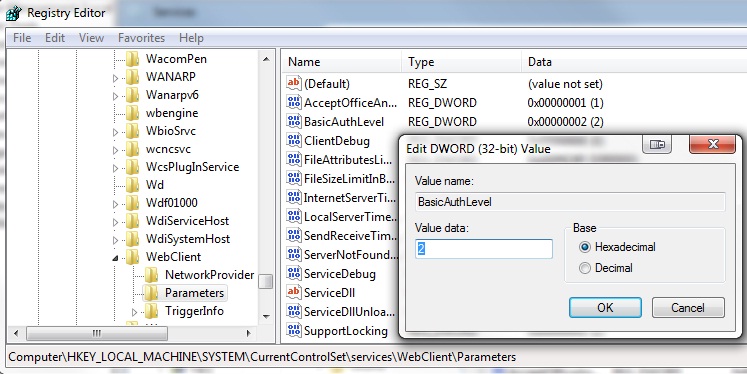
Now reboot!! The registry changes don't seem to bite until you doe. Finally go to map network drive and add the details as so:
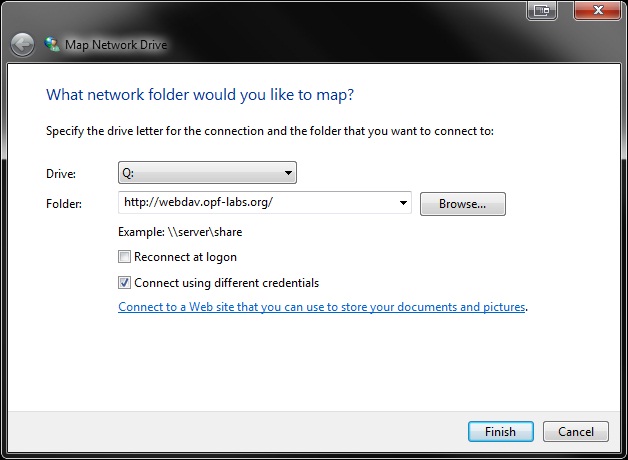
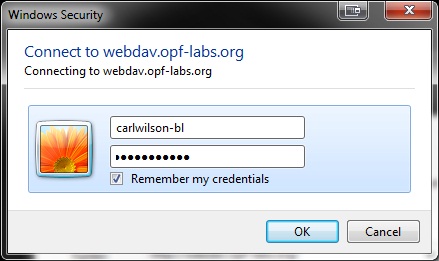
Tick reconnect at logon if you wish to stay connected between sessions. Hit finish and add your SCAPE Jira credentials when asked, remember if you wish:
Hopefully that's everything.