
/pages/viewpage.action?pageId=16023624 taken on 2020-08-05.
The original wiki at wiki.opf-labs.org is being decommissioned.
Metrics catalogue
Metrics Catalogue
To unify metrics across all evaluations all metrics should be registered in this Metrics Catalogue. So - when picking metrics for an evaluation run through the catalogue and pick any already defined or enter a new metric when needed.
Use CamelCase notation for metric names - e.g. NumberOfObjectsPerHour
| Metric |
Datatype |
Description |
Example |
Comments |
|---|---|---|---|---|
| NumberOfObjectsPerHour | integer | Number of objects that can be processed per hour |
250 |
Could be used both for component evaluations on a single machine and on entire platform setups |
| FMeasure |
integer |
Defining a statistical measure for binary evaluations - see detailed specification below |
83 % |
Between 0 and 100 |
Binary evaluation method (FMeasure)
We use sensitivity and specificity as statistical measures of the performance of the binary classification test where
Sensitivity = Σ true different / (Σ true different + Σ false similar)
and
Specificity = Σ true similar / (Σ true similar + Σ false different)
and the F-measure is calculated on this basis as shown in the table below:
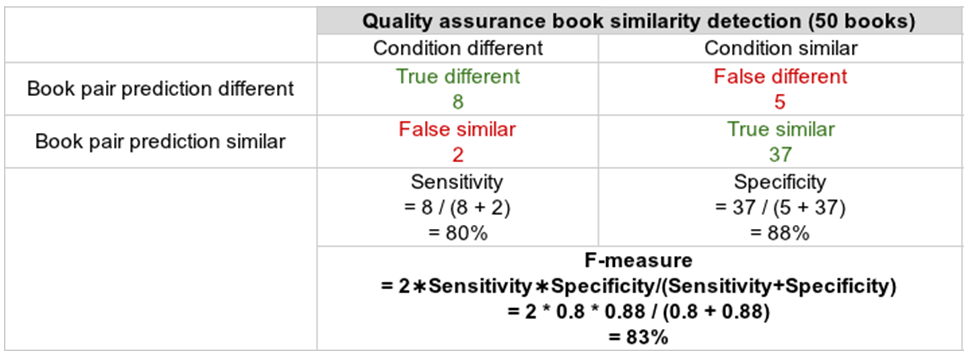
This is one suggested way which is nicely applicable if we test for binary correctness of calculations, i.e. it is applicable for characterisation and QA